

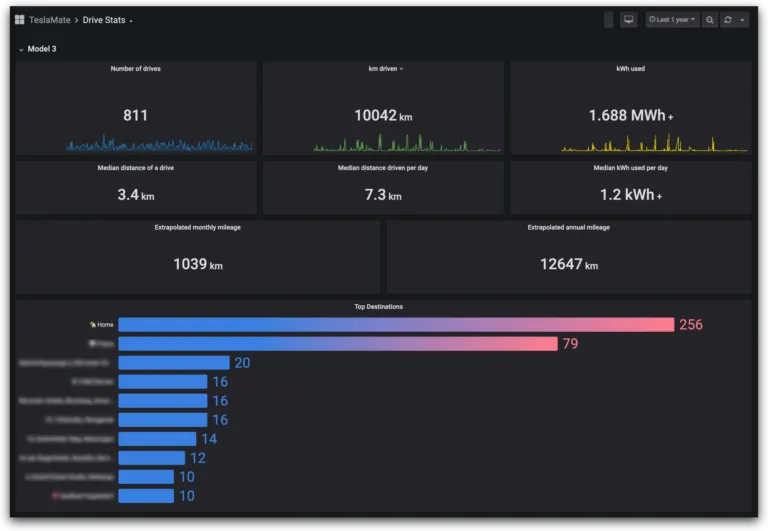
Choosing between TeslaMate and TeslaFi comes down to how much control you want versus how little setup you’re willing to do. TeslaFi is a polished, ready-to-go cloud service. TeslaMate is the open-source data logger power users love — and MyTeslaMate is that same TeslaMate, hosted for you so you skip the server work. Here’s an honest side-by-side.
Quick comparison table
| TeslaMate (self-hosted) | MyTeslaMate | TeslaFi | |
|---|---|---|---|
| Hosting | Self-hosted | Cloud (EU) | Cloud (US) |
| Setup | Technical | None | None |
| Price | Free + your hosting | €4.99/mo (€3.75 billed yearly) | ~$7.99/mo |
| Free trial | n/a | 14 days | Yes |
| Open source | Yes | Built on TeslaMate | No |
| Dashboards | Grafana | Grafana | Built-in web UI |
| Tesla Fleet API proxy | Manual | Included, free | No |
| Home Assistant integration | Manual | Free proxy included | No |
| AI / LLM chat assistant | No | Yes | No |
| Sentry break-in alerts | No | Yes (even when Sentry is off) | No |
| Data export / ownership | Full | Full (downloadable backups) | Limited |
1. Platform type
- TeslaMate — an open-source platform you self-host, offering deep customization but demanding technical know-how.
- MyTeslaMate — a cloud-hosted version of TeslaMate, the same features without the server administration.
- TeslaFi — a cloud service (running since 2016) with its own tracking and analytics, behind a subscription.
2. Setup & ease of use
TeslaFi and MyTeslaMate are both sign-up-and-go: no server, no database, no maintenance. Self-hosted TeslaMate requires a Linux host, PostgreSQL, backups and updates — great if you enjoy that, a barrier if you don’t.
3. Features & dashboards
TeslaMate (and therefore MyTeslaMate) builds its dashboards on Grafana, which is enormously flexible — you can slice charging, drives, efficiency and battery-degradation data almost any way you like. TeslaFi uses its own built-in web interface; both services are browser-based (neither ships a native mobile app).
MyTeslaMate adds several things TeslaFi doesn’t offer:
- A free Tesla Fleet API proxy — send commands and use live telemetry with no setup.
- A Home Assistant integration through that same proxy.
- An AI chat assistant to command and query your Tesla in plain language (no LLM subscription).
- Sentry Guard break-in alerts on Telegram — you get pinged even when Tesla’s Sentry Mode is turned off to save battery.
- Open-source foundations (TeslaMate) and full data ownership.
4. Cost
- TeslaMate — free to run, but you pay for hosting and your own time.
- MyTeslaMate — €4.99/month per vehicle, or €3.75/month billed yearly, with a 14-day free trial. Fleet API usage is included.
- TeslaFi — around $7.99/month (with annual discounts).
5. Data privacy & ownership
TeslaMate and MyTeslaMate are open-source at their core, and MyTeslaMate lets you download a full backup at any time — your data stays portable. TeslaFi stores your data on its own servers with more limited export.
When TeslaFi is the better choice
Let’s be fair — TeslaFi is a mature product, and for some people it’s the better pick:
- You want a long-established service (running since 2016) with a large community and lots of existing tutorials.
- You prefer a single, built-in interface and don’t want to learn Grafana.
- You want TeslaFi’s very granular sleep and polling controls, which it’s well known for.
- You’re already invested in TeslaFi and happy with it.
If any of those describe you, TeslaFi is a perfectly good home for your data.
When MyTeslaMate is the better choice
- You want TeslaMate’s Grafana dashboards and open-source transparency, without hosting a server.
- You want full data ownership and downloadable backups.
- You need a free Tesla Fleet API proxy for automations, Home Assistant, or your own scripts.
- You want the AI chat assistant and Sentry Guard break-in alerts (even when Sentry Mode is off).
- You’d like lower pricing — €3.75/month billed annually.
How to migrate from TeslaFi to MyTeslaMate
Switching keeps your history — you don’t start from zero:
- Export your data from TeslaFi (Settings → your data export).
- Create your MyTeslaMate account and start your 14-day trial.
- Send us your export via chat, and we’ll import it into your hosted TeslaMate instance.
Coming from a self-hosted TeslaMate instead? We can restore your existing backup directly.
Conclusion
TeslaFi is a mature, turnkey cloud service with a loyal community. Self-hosted TeslaMate is unbeatable for tinkerers who want full control. MyTeslaMate sits in between: the open-source Grafana experience and full data ownership, with none of the server work — plus a free Fleet API, Home Assistant, an AI assistant and Sentry Guard on top. For most Tesla owners who want power without maintenance, it’s the best fit.